DNS Management
The DNS Management service in ANDES enables centralized management of DNS records for external IPs in GCP that require FQDN through AKAMAI. This automated solution significantly reduces provisioning times and minimizes human errors.
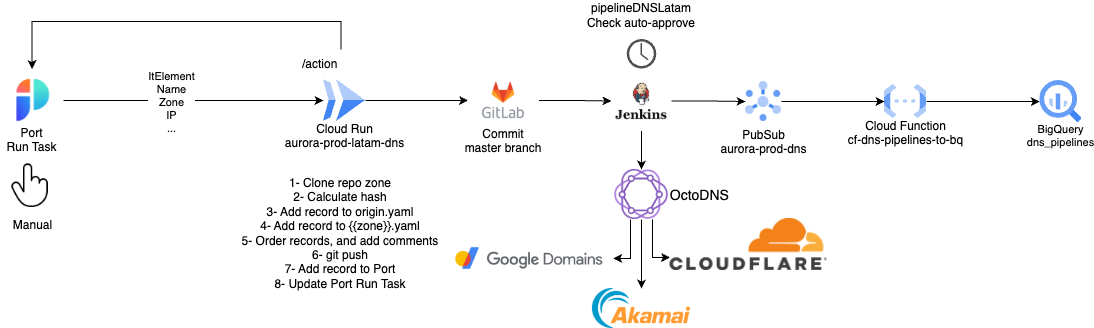
Create DNS
To create DNS, go to the catalog page.
Parameters
- It's GCP Latam IP: Indicates whether the IP is in a GCP project within the Latam Airlines organization. Otherwise, one will be created
- IT Element: Product or asset related to the resources, used to filter GCP projects.
- GCP Project: GCP project where the IP has been configured.
- IP: Address associated with the DNS record.
- Domain: Approved domains for this functionality.
- Zone: Zones where this functionality is allowed.
- Name: Descriptive name of the record.
- Description: Required field to describe the purpose or use of the record.
Important Remember that to create a DNS record, you must belong to a squad and it must have the IT Element associated. You also need to label the GCP projects.
Edit DNS
- Go to the DNS list; you can only edit DNS records associated with your squad, otherwise you will be alerted that permissions are required.
- Go to the actions ⚡️ section and run Edit DNS records
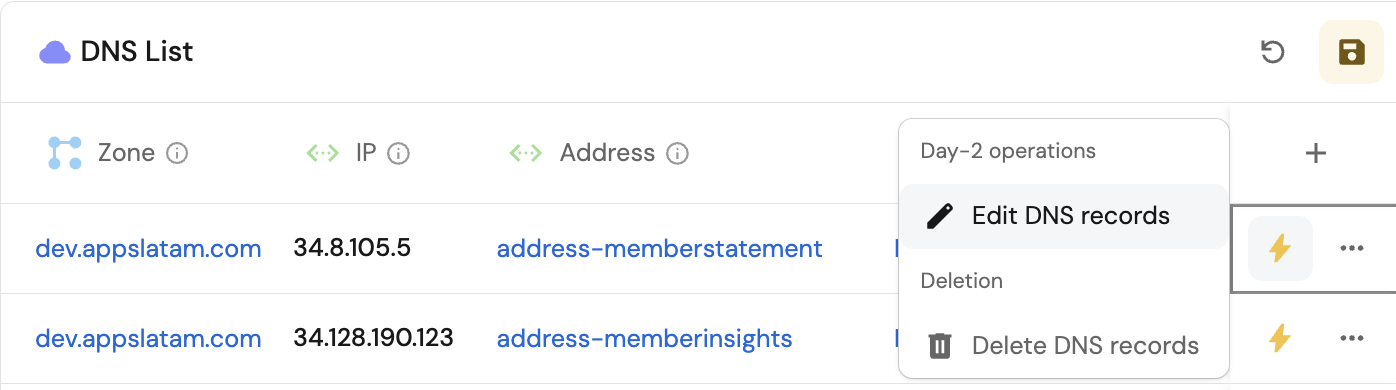
:Parameters
- It's GCP Latam IP: Indicates whether the IP is in a GCP project within the Latam Airlines organization. Otherwise, one will be created
- IT Element: Product or asset related to the resources, used to filter GCP projects.
- GCP Project: GCP project where the IP has been configured.
- IP: Address associated with the DNS record.
- Description: Required field to describe the purpose or use of the record.
Delete DNS
- Go to the DNS list; you can only delete
**DNS**records associated with your squad, otherwise you will be alerted that permissions are required. - Go to the actions ⚡️ section and run
Delete DNS records.