Squad Management
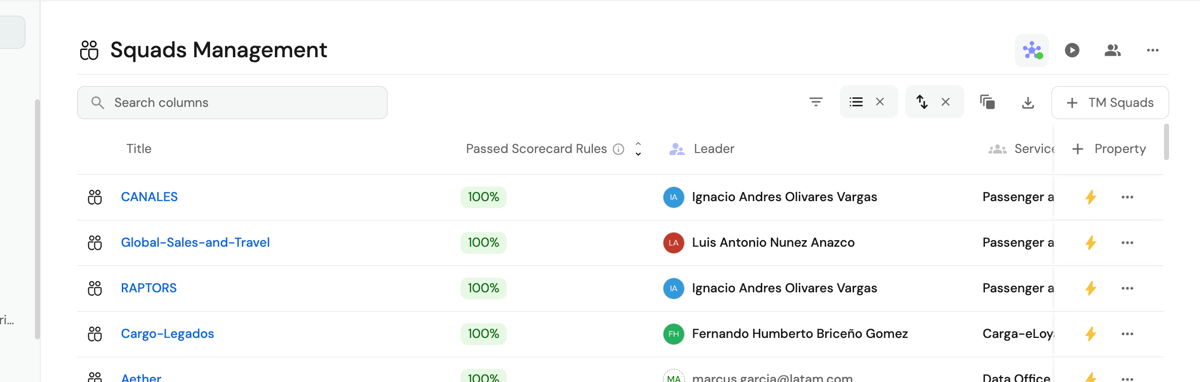
As a lead, it is important to manage each member effectively to maximize productivity and achieve project goals. Follow the steps below:
-
Access Squad Management: Go to the Squad Management portal to start managing your team.
-
Find your team: Once on the platform, use the search bar to locate the team you need to manage. Enter the exact name or use relevant keywords to make the search easier.
-
Assign roles: After locating the squad, review the current member list. Place each person in the role that best aligns with their skills and experience.
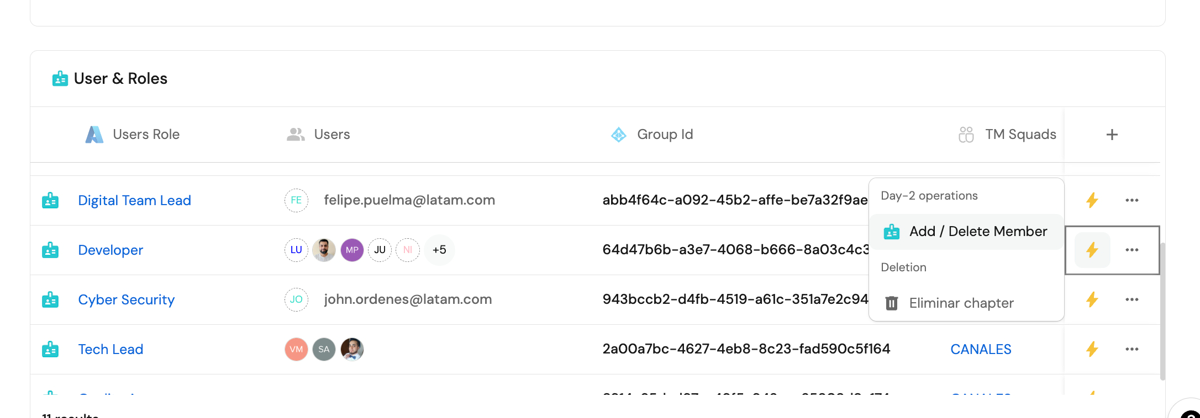
📍 GitLab synchronization
When a user is added to a squad, they automatically receive the corresponding permissions in the GitLab group
associated with the squad. This group is obtained directly from the IT Element.
Squad MGMT access
| User type | Access | Permissions |
|---|---|---|
| Squad members | Can view squad information. | Read-only. |
| Squad Leader | Full access to squad configuration. | Add and remove members / Assign IT Assets / Modify roles within the squad. |
| Chapter DevSecOps | Squad oversight and support. | Modify squad structure / Validate IT Asset assignments. |
| Talent Management | Organizational structure governance. | Create and delete squads / Define standard roles / Manage Azure AD integration. |
📌 Changes in Squad MGMT are automatically reflected in Azure AD.
Frequently asked questions (FAQ)
  #### 1. Who is responsible for keeping a Squad up to date?
  🔹 The Squad Leader is responsible for managing the team and keeping information current.

  #### 2. How are Squads created in Squad MGMT?
  🔹 Talent Management handles squad creation and assignment with standard roles, or in the future the DTL, DCL, or DevSecOps

  #### 3. How are IT Assets or IT Elements associated?
  🔹 Each Squad manages the resources it administers from GetPort

  #### 4. How are IT Assets or IT Elements associated?
  🔹 The Squad Lead and DevSecOps are responsible for keeping IT Elements associated with the squad
Conclusion
Squad MGMT simplifies team, access, and resource management in a secure, centralized way.
Recommended actions:
✅ Squad Leaders should review and update their teams periodically.
✅ Talent Management will ensure organizational alignment and structure control.
✅ All configuration is managed through GetPort with Azure AD integration.