CloudBees to GitLab CI/CD Migration
To perform migrations from Cloudbees with framework-1 to Gitlab with framework-2,
we recommend:
- Start migrations with low-impact projects.
- Keep a local backup of
Jenkinsfilein case of incident for high-impact pipelines. - Request GCP account permissions before migrating
Introduction
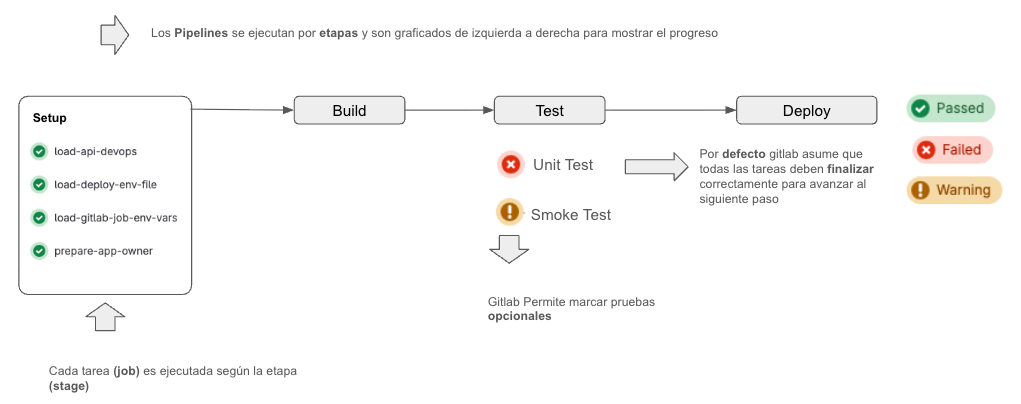
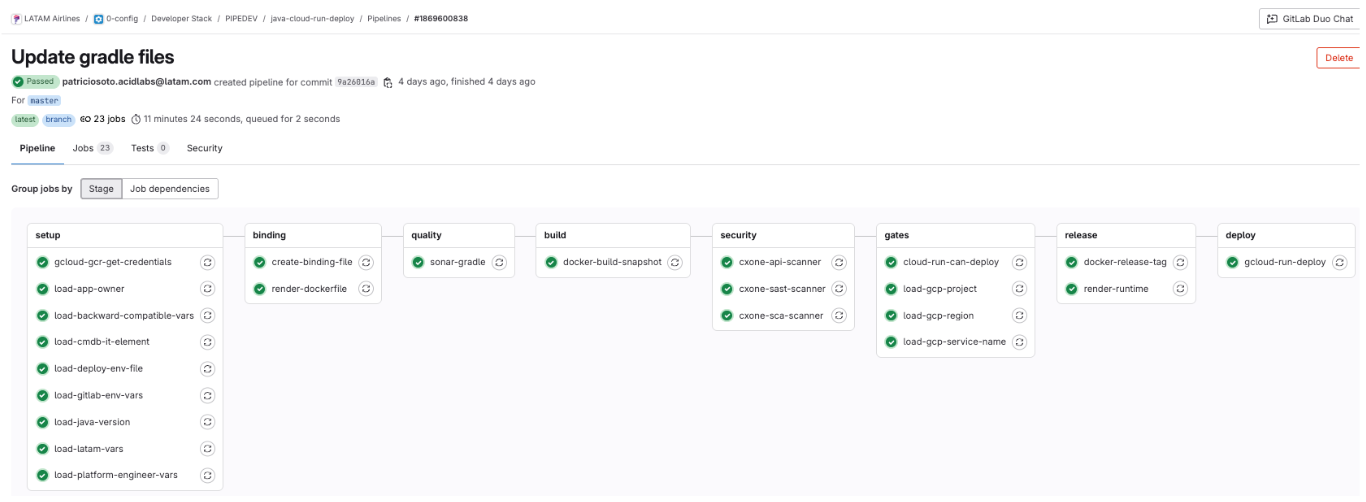
- Pipelines run in stages and are graphed from left to right to show progress.
- Each task is executed according to the stage it is in.
- All tasks within the same stage run in parallel, unless an explicit dependency is defined between them.
- By default Gitlab assumes that all tasks must finish successfully to advance to the next stage.
- Gitlab allows marking task as optional (Warning).
important
More information about migration from framework-1 in:
https://gitlab.com/latamairlines/config/devops/pipelines
- 🎯 What is FW2?
- ✨ The One-Line Rule
- 📦 Component Repositories
- 🌐 CI/CD Framework Ecosystem
- ⚙️ Requirements to Use Pipelines
- 🌿 Branching Strategy and Environments
- 🔄 Pipeline Workflow
- 🚀 Quick Start
- 💡 Usage Examples
- 🔧 Pipeline Configuration and Variables
- 🏢 Organizational Structure in GitLab
- 🎯 FW2 Pipelines Vision
- 🤝 Contributions
- 📞 Support
Migration Scope
Within Cloudbees there is a shared library that contains multiple functions and definitions that are used
in the Jenkinsfile of the projects.
| Migrable | pipeline_type |
|---|---|
| ANDES Delivery | Abstraction |
| ANDES Delivery | BitriseDeployment |
| ANDES Delivery | BrowserStackDeployment |
| ANDES Delivery | BuildDeployment |
| ANDES Delivery | CloudBuildDeploy |
| ANDES Delivery | CloudDataflowDeploy |
| ANDES Delivery | CloudDataflowDeployMultiparams |
| ANDES Delivery | CloudFunctionDeploy |
| ANDES Delivery | CloudRunDeploy |
| ANDES Delivery | CloudRunDeployJava17 |
| ANDES Delivery | ComposerAirflowVars |
| ANDES Delivery | ComposerDeployment |
| ANDES Delivery | Composerv1Deployment |
| ANDES Delivery | CypressE2E |
| ANDES Delivery | FrameworkIacDeployment |
| ANDES Delivery | GApiGatewayDeployment |
| ANDES Delivery | GEndpointsDeployment |
| ANDES Delivery | GkeRollBack |
| ANDES Delivery | HelmChartInstall |
| ANDES Delivery | HelmChartPublish |
| ANDES Delivery | Java17Publish |
| ANDES Delivery | JavaPublish |
| ANDES Delivery | K6Deployment |
| ANDES Delivery | KraneAngularDeployment |
| ANDES Delivery | KraneBuildDeployDeployment |
| ANDES Delivery | KraneDeployDeployment |
| ANDES Delivery | KraneJava11JavaDeployment |
| ANDES Delivery | KraneJava17JavaDeployment |
| ANDES Delivery | KraneJava8JavaDeployment |
| ANDES Delivery | KraneNestJSDeployment |
| ANDES Delivery | KranePythonDeployment |
| ANDES Delivery | KranePythonDeploymentV1 |
| ANDES Delivery | KraneReactDeployment |
| ANDES Delivery | KubectlSecretsDeployment |
| ANDES Delivery | NpmMobilePublish |
| ANDES Delivery | NpmPublish |
| ANDES Delivery | SecretDeployment |
| ANDES Delivery | ShutdownNamespaceDeployment |
| ANDES Delivery | StartupNamespaceDeployment |
| ANDES Delivery | SuperTest |
| ANDES Delivery | SuperTestDeployment |
| ANDES Delivery | WebDriverDeployment |
| CROSS | ansible |
| CROSS | AnsibleConfigurationManager |
| CROSS | BashDeploy |
| CROSS | WeblogicDataSourceDeploy |
| CROSS | WeblogicDeployment |
| CROSS | WeblogicNoFwkDeployment |
| PCI | CloudFunctionPCIDeploy |
| PCI | KraneJava17JavaPCIDeployment |
| PCI | KraneNodejsPCIDeployment |
| PCI | KubectlJava17PCIDeployment |
| PCI | RollbackPCI |
| RUNWAY | ComposerEMXDeployment |
| RUNWAY | HelmAngularEMXDeployment |
| RUNWAY | HelmJava17EMXDeployment |
| RUNWAY | HelmLiquibaseEMXDeployment |
| RUNWAY | HelmNestJSEMXDeployment |
| RUNWAY | KraneAngularEMXDeployment |
| RUNWAY | KraneDeployEMXDeployment |
| RUNWAY | KraneJava11EMXDeployment |
| RUNWAY | KraneJava17EMXDeployment |
| RUNWAY | KraneNestJSEMXDeployment |
Migration with ChatBot
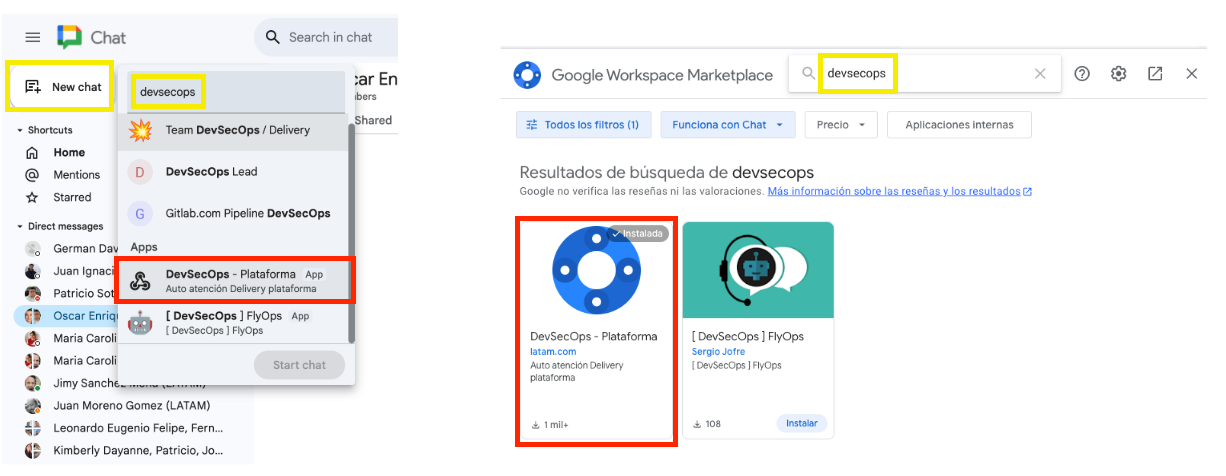
- In Google Chat, in the Apps section (bottom of the left bar) select Find apps.
- Search for the App called
ANDES Botand install it. - Now you can interact with the ChatBot to request different actions related to the platform.
More information at
To migrate a project from CloudBees to Gitlab CI/CD, you must request the pipeline creation using the ChatBot as follows:
Request pipeline migration
8.2 https://gitlab.com/latamairlines/path/sub-path/project
- This process will create a Jira ticket to track the migration process.
- Once the migration is finished, you will be notified through the same created ticket.
- In the gitlab project, a
.gitlab-ci.ymlfile will be created with the pipeline definition based onframework-2, in a dedicated branch for review and adjustments.
tip
In case of having a pipeline that experiences any error that does not allow its normal deployment, report it via ticket in option 8.4 of the Chatbot.