Spring Integration Template
Purpose and Scope
The Latam Development Stack Spring Integration Template was created to facilitate the creation of Java components whose purpose is to implement business logic. The template is limited to:
- Integration with Pub/Sub components for message publishing and retrieval.
- Integration with Google Cloud Storage components.
- Integration with PostgreSQL database.
- Integration with Redis for in-memory data storage.
- Integration with REST Services (OpenFeign).
- Integration with Apache Kafka.
The Spring Integration template includes security libraries and base images authorized by the company.
Architecture
This application has a hexagonal architecture with three layers:
- Infrastructure Layer: responsible for application operation (configurations, connections to external resources).
- Application Layer: responsible for implementing application entry points.
- Domain Layer: responsible for implementing the model and business logic.
Java package: Package usage must follow the hexagonal architecture and also contain a base package with the
following
nomenclature: com.latam.[it_element].[component_feature].
- Example:
com.latam.ltmds.intg(Note: the project sources usecom.latam.lataminit_itelement.lataminit_use_case)
Technologies and Dependencies
- Language: Java 21
- Framework: Spring Boot 3.4.5
- Database: PostgreSQL
- Messaging:
- Google Cloud Pub/Sub (
com.google.cloud:spring-cloud-gcp-starter-pubsub:6.1.1) - Apache Kafka (
org.springframework.kafka:spring-kafka:4.0.0-M1)
- Google Cloud Pub/Sub (
- Storage: Google Cloud Storage (
com.google.cloud:spring-cloud-gcp-starter-storage) - Cache: Redis (
redis.clients:jedis:5.0.2,org.springframework.data:spring-data-redis:4.0.0-M1) - REST Communication: OpenFeign (
org.springframework.cloud:spring-cloud-starter-openfeign:4.2.0) - Embedded Web Server: Tomcat (via
spring-boot-starter-tomcat) - Logging: Latam Logging Library (
com.latam:latam-logging-library:1.0.17), Logstash Logback Encoder (net.logstash.logback:logstash-logback-encoder:8.0) - Build Tool: Gradle
- Others: Lombok, Spring Boot Actuator, Spring Integration, Jakarta Annotations, SpotBugs Annotations, Commons IO.
Local Setup
Prerequisites
- JDK 21
- Gradle
- IntelliJ IDEA Community (Recommended)
- Access to JFrog Artifactory to create an API Key
- Git
Setup Steps
-
Clone the repository: Follow these steps
-
Configure Artifactory credentials: Access Artifactory LATAM with your G Suite account. In "Authentication Settings", generate an API Key (Artifactory Settings). Create a
gradle.propertiesfile in the project root (this file is excluded by.gitignore, do not commit it) with your JFrog credentials:ARTIFACTORY_BASE_URL=https://artifactoryrepo1.appslatam.com/artifactory/ARTIFACTORY_GRADLE_CORP_REPO=corp-libs-gradle-releaseARTIFACTORY_USERNAME=<your_artifactory_username>ARTIFACTORY_PASSWORD=<your_artifactory_api_key>More information in Gradle Local.
-
Build the project: From the console, at the project root:
./gradlew clean build -
Run the application: Once successfully compiled (
BUILD SUCCESSFULmessage):./gradlew bootRunThe application will be available (by default) at
http://localhost:8080/template-intg.
Deployment
Deployment with Java 21
Modify the pipeline line in Jenkinsfile:
pipelineLatam("gke-krane-java21")
Deployment with Native Image (GraalVM)
- Modify the pipeline line in
Jenkinsfile(according to the README convention, it might be something like):(Note: The currentpipelineLatam("gke-krane-native-java21")Jenkinsfiledoes not show this option; adapt as necessary.) - In the
deploy/envfolder, add.yamlfiles for each environment (dev, intg, prod) with the content: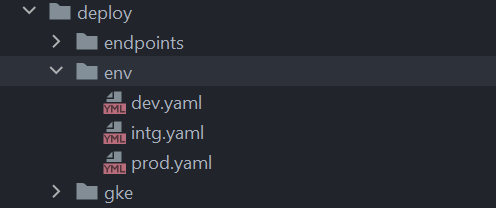 (
((environment_name).yamlfile)native: true - In the
gradle/config.gradlefile, enable JAR generation:jar {enabled = true}
For more information, see Spring Boot v3 Migration.
API Endpoints
The application exposes the following REST endpoints under the base path /template-intg.
Authentication: Most endpoints may require authentication via google_id_token, serviceaccount_jwt, or
azure_id_token as Bearer tokens in the Authorization header.
Flight Management (Flights)
| Method | Path | Description | Request Example (Body) |
|---|---|---|---|
| GET | /v1/api/flights | Lists all flights (paginated). Allows query params: origin, destination, current_page. | N/A |
| POST | /v1/api/flights | Creates a new flight. | FlightDTO (see com.latam.lataminit_itelement.lataminit_use_case.application.request.FlightDTO) |
| GET | /v1/api/flights/{number} | Gets a flight by number. | N/A |
| PUT | /v1/api/flights/{number} | Updates a flight by number. | FlightDTO |
| DELETE | /v1/api/flights/{number} | Deletes a flight by number. | N/A |
Pub/Sub Messaging
| Method | Path | Description | Query Params |
|---|---|---|---|
| POST | /v1/api/pubsub | Sends a message to the Pub/Sub queue. | messageSend (String) |
File Management (Cloud Storage)
| Method | Path | Description | Query Params |
|---|---|---|---|
| GET | /v1/api/files/files | Lists objects in a bucket. | N/A |
| POST | /v1/api/files | Uploads a file (multipart/form-data) to a bucket. | file (MultipartFile) |
| DELETE | /v1/api/files | Deletes a file from a bucket. | fileName (String) |
| GET | /v1/api/files | Downloads a file from a bucket. | fileName (String) |
Redis Cache
| Method | Path | Description | Query Params | Request Example (Body) |
|---|---|---|---|---|
| POST | /v1/api/redis | Creates an object in the Redis cache. | collection (String) | JSON (any object) |
| GET | /v1/api/redis | Returns the stored data collection. | collection (String) | N/A |
| GET | /v1/api/redis/{key} | Returns the object associated with the key. | collection (String) | N/A |
| PUT | /v1/api/redis/{key} | Updates the object associated with the key. | collection (String) | JSON (any object) |
| DELETE | /v1/api/redis/{key} | Deletes the object associated with the key. | collection (String) | N/A |
REST Services (OpenFeign)
| Method | Path | Description | Query Params |
|---|---|---|---|
| GET | /v1/api/rest | Sends a request to a configured REST service. | origin, destination, current_page |
Kafka Messaging
| Method | Path | Description | Query Params |
|---|---|---|---|
| POST | /v1/api/kafka (Note: README says /v1/api/kafka/send, but code uses /v1/api/kafka) | Sends a message to the Kafka queue. | messageSend (String) |
Specific Components
Pub/Sub
-
Configuration: Modify
src/main/resources/application.yaml:gcp:topic:name: ae-dev-example# Replace with your topic name (or ${TOPIC_NAME:${{ TOPIC-NAME }}})subscription:name: ae-dev-example-subscription# Replace with your subscription name (or ${SUSCRIPTION_NAME:${{ SUSCRIPTION-NAME }}})Make sure the
GOOGLE_APPLICATION_CREDENTIALSenvironment variable is configured locally. -
Implementation: See
PubSubController.java(incom.latam.lataminit_itelement.lataminit_use_case.application.rest) andPubSubReceiver.java,PubSubPublisher.java(incom.latam.lataminit_itelement.lataminit_use_case.infrastructure.pubsub). -
Disable:
- Remove the
com.google.cloud:spring-cloud-gcp-starter-pubsubdependency fromgradle/dependencies.gradle. - Remove the related Java files:
PubSubController.java,PubSubService.java,PubSubPublisher.java,PubSubReceiver.java. - Remove the
gcp.topicandgcp.subscriptionproperties fromapplication.yaml.
- Remove the
Storage (Google Cloud Storage)
- Configuration: Modify
src/main/resources/application.yaml:Make sure thegcp:bucket:name: ae-dev-us-example # Replace with your bucket name (or ${BUCKET_NAME:${{ BUCKET-NAME }}})GOOGLE_APPLICATION_CREDENTIALSenvironment variable is configured locally. - Implementation: See
FileController.java(incom.latam.lataminit_itelement.lataminit_use_case.application.rest) andFileService.java(incom.latam.lataminit_itelement.lataminit_use_case.domain.service). - Disable:
- Remove the
com.google.cloud:spring-cloud-gcp-starter-storagedependency fromgradle/dependencies.gradle. - Remove the related Java files:
FileController.java,FileService.java. - Remove the
gcp.bucket.nameproperty fromapplication.yaml.
- Remove the
Redis
- Configuration: Modify
src/main/resources/application.yaml:redis:hostname: localhost # Replace with your Redis hostname (or ${REDIS_HOSTNAME:${{ REDIS-HOSTNAME }}})port: 6379 # Replace with your Redis port (or ${REDIS_PORT:${{ REDIS-PORT}}}) - Implementation: See
RedisController.java(incom.latam.lataminit_itelement.lataminit_use_case.application.rest),RedisService.java(incom.latam.lataminit_itelement.lataminit_use_case.domain.service),RedisRepository.java(incom.latam.lataminit_itelement.lataminit_use_case.infrastructure.redis), andRedisConfig.java(incom.latam.lataminit_itelement.lataminit_use_case.infrastructure.config). - Disable:
- Remove the
redis.clients:jedisandorg.springframework.data:spring-data-redisdependencies fromgradle/dependencies.gradle. - Remove the related Java files:
RedisConfig.java,RedisController.java,RedisException.java,RedisPort.java,RedisRepository.java,RedisService.java. - Remove the
RedisExceptionExceptionHandlerinApiExceptionHandler.java. - Remove the
redis.hostnameandredis.portproperties fromapplication.yaml.
- Remove the
REST Services (OpenFeign)
- Configuration: Modify
src/main/resources/application.yaml:rest-service:endpoint: "http://${APPLICATION}-template-spring-dal-service.${APPLICATION}-${ENVIRONMENT:dev}.svc.cluster.local/api/dal"# Replace with your endpoint (or ${REST_ENDPOINT:${{ REST-ENDPOINT}}}) - Implementation: See
RestServiceController.java(incom.latam.lataminit_itelement.lataminit_use_case.application.rest),RestService.java(incom.latam.lataminit_itelement.lataminit_use_case.domain.service),RestClient.java(incom.latam.lataminit_itelement.lataminit_use_case.domain.repository), andFlightRestFeignClientConfiguration.java(incom.latam.lataminit_itelement.lataminit_use_case.infrastructure.config). - Disable:
- Remove the
org.springframework.cloud:spring-cloud-starter-openfeigndependency fromgradle/dependencies.gradle. - Remove the related Java files:
RestClient.java,RestServiceController.java,FlightRestFeignClientConfiguration.java,RestService.java. - Remove the
@EnableFeignClientsannotation fromApplication.java. - Remove the
rest-service.endpointproperty fromapplication.yaml.
- Remove the
Kafka
- Configuration: Modify
src/main/resources/application.yaml:kafka:broker:address: localhost:29092 # Replace with your broker address (or ${BROKER_ENDPOINT:${{ BROKER-ADDRESS }}})topic: kafka-topic # Replace with your topic (or ${KAFKA_TOPIC:${{ KAFKA-TOPIC }}})producer:name: kafka-producer # (or ${PRODUCER_NAME:${{ PRODUCER-NAME }}})consumer:name: kafka-consumer # (or ${CONSUMER_NAME:${{ CONSUMER_NAME }}})group: kafka-group # (or ${CONSUMER_GROUP:${{ CONSUMER_GROUP }}})# Also consider Kafka security properties in application.yaml if needed:# spring.kafka.properties.sasl.*, spring.kafka.properties.security.protocol, etc. - Implementation: See
KafkaController.java(incom.latam.lataminit_itelement.lataminit_use_case.application.rest),KafkaService.java(incom.latam.lataminit_itelement.lataminit_use_case.domain.service),KafkaProducer.java,KafkaConsumerListener.java(incom.latam.lataminit_itelement.lataminit_use_case.infrastructure.kafka), andKafkaConfig.java(incom.latam.lataminit_itelement.lataminit_use_case.infrastructure.config). - Disable:
- Remove the
org.springframework.kafka:spring-kafkadependency fromgradle/dependencies.gradle. - Remove the related Java files:
KafkaController.java,KafkaConsumerListener.java,KafkaProducer.java,KafkaService.java,KafkaPort.java,KafkaConfig.java. - Remove the
kafka.broker,spring.kafka.properties, etc. properties fromapplication.yaml.
- Remove the
Testing
This project includes configurations for automated testing with JMeter. The original project README provides detailed instructions.
How to Use JMeter
- Navigate to the
tests/jmeter/binfolder (if it exists and is populated) and runjmeter.bat(Windows) orjmeter.sh(Linux/macOS). - In JMeter, go to "File" -> "Open" and select a test plan from the
tests/Template spring-intg test planfolder (if it exists). - Click the green arrow to run the test plan.
- View the results.
Important (according to the original README):
- For Kafka tests, JMeter may require a local Kafka installation.
- For GCP Pub/Sub and Storage, make sure you have the appropriate permissions.
The project also uses JUnit 5 and Mockito for unit and integration tests, executed with Gradle:
./gradlew test
Jacoco reports are generated in build/reports/jacoco/test/html/.
Security Considerations
- Credential Management: Sensitive credentials (such as API keys, database passwords) should be managed through
secrets in the deployment environment (e.g., Kubernetes Secrets) and should not be committed to the repository. The
local
gradle.propertiesfile is an example of how to handle development credentials locally without uploading them to the repository. - Environment Variables: Use environment variables to configure sensitive application aspects in different environments (dev, intg, prod).
- Cloud Endpoints Security: For APIs exposed through Google Cloud Endpoints, configure the appropriate security
definitions (JWT, API Keys) as specified in
deploy/endpoints/openapi.yaml.erb.