GitLab Duo Workflow - Security Vulnerability Flow

Tired of spending time updating libraries or fixing vulnerabilities in your dependency tree?
Meet the ANDES Dependency Manager, a custom GitLab agent for LATAM that automates the analysis and remediation of security vulnerabilities in your project dependencies.
What is the ANDES Dependency Manager?
The ANDES Dependency Manager is a custom AI assistant that detects vulnerabilities in your repository
dependencies, generates a detailed analysis, and can automatically create a Merge Request with the necessary
updates to fix them—just by mentioning the bot @ai-andes-dependency-manager-latam-airlines in an issue or MR.
No waiting, no manual processes: Simply write a comment and the agent does the work.
Before using the ANDES Dependency Manager, an Owner or Maintainer of the repository must activate this
capability in GitLab. This is done at the repository or subgroup level to enable access to
@ai-andes-dependency-manager-latam-airlines.
Contact your technical lead or the ANDES team to request activation if it's not yet available in your project.
How to use: Basic syntax
The syntax is simple. In an issue or Merge Request, write:
@ai-andes-dependency-manager-latam-airlines [description] [optional parameters]
Available parameters
| Parameter | Type | Description |
|---|---|---|
issue #NNN | Required | IID of the issue where the result comment will be published |
target_branch: BRANCH | Optional | Target branch for the MR. Default: main |
report_only | Optional | Generate only the report without creating branch or MR |
Parameters are independent and can be combined in any order.
Step by step: How to run the flow
Step 1️⃣: Mention the agent in your issue or MR
Create a technical issue or MR where you need to analyze and fix vulnerabilities. Then, in the comments, mention the agent with your command:
@ai-andes-dependency-manager-latam-airlines Fix dependency vulnerabilities. issue #42
The flow starts working immediately. It will take a few minutes to complete the analysis.
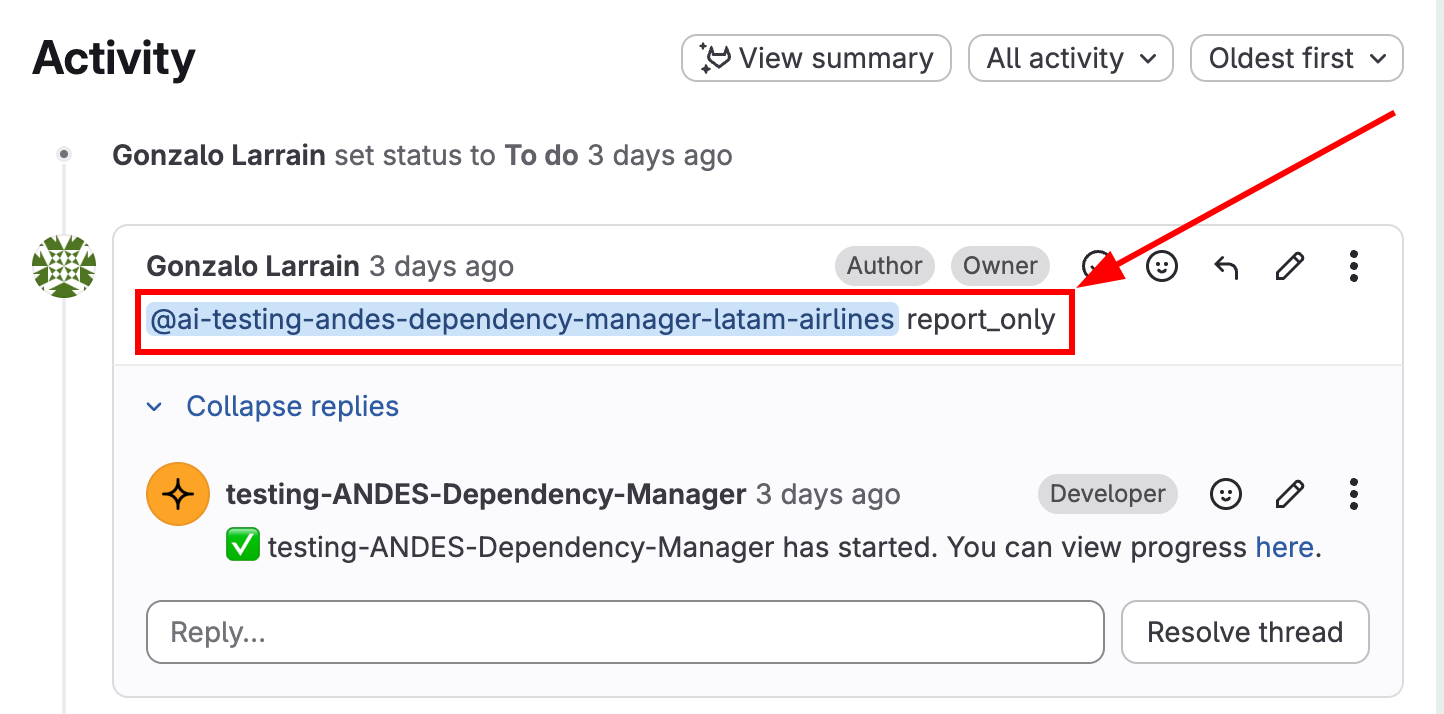
The agent will confirm that it has started and will begin analyzing all dependencies in your project.
Step 2️⃣: Receive the vulnerability report
Depending on which option you chose, you'll receive different results:
Option A: Report only (report_only)
If you used the report_only option:
@ai-andes-dependency-manager-latam-airlines report_only. issue #31
The flow will generate a complete report without creating changes. You'll see something like this:
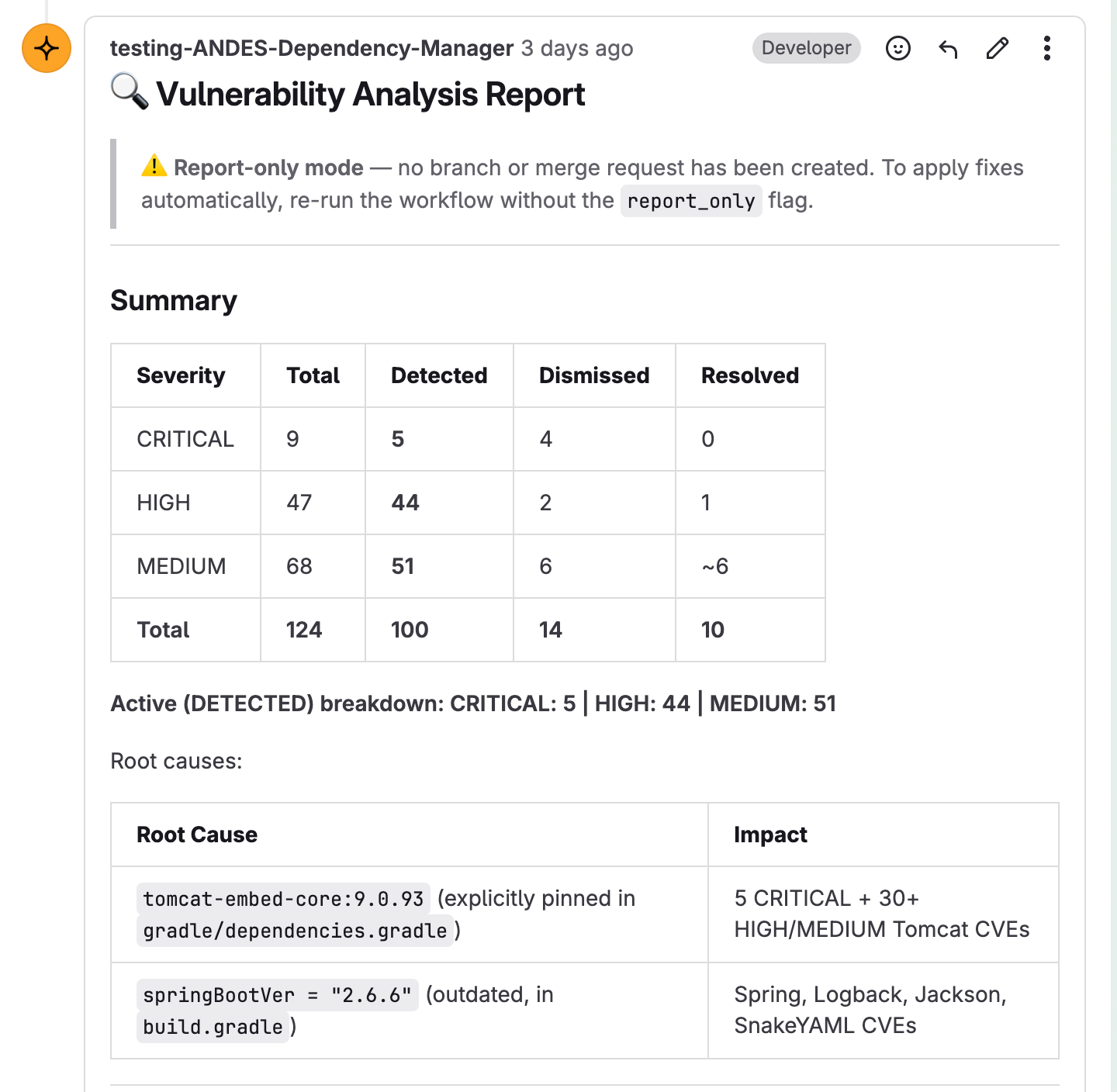
Report content:
- Summary: table with severities (CRITICAL, HIGH, MEDIUM)
- Root Cause: analysis of the root cause of each vulnerability
- Impact: which components are affected
- Total number of detected vulnerabilities and their status
This is ideal if you want to:
- ✅ Conduct a security audit
- ✅ Review impact before applying changes
- ✅ Evaluate risk with your team
Later, if you decide to apply the changes, you can run the same flow without report_only.
Option B: Full flow (create MR automatically)
If you used the flow without report_only:
@ai-andes-dependency-manager-latam-airlines Fix vulnerabilities. issue #55. target_branch: develop
The agent will automatically create a Merge Request with all vulnerabilities fixed. You'll see a response like this:
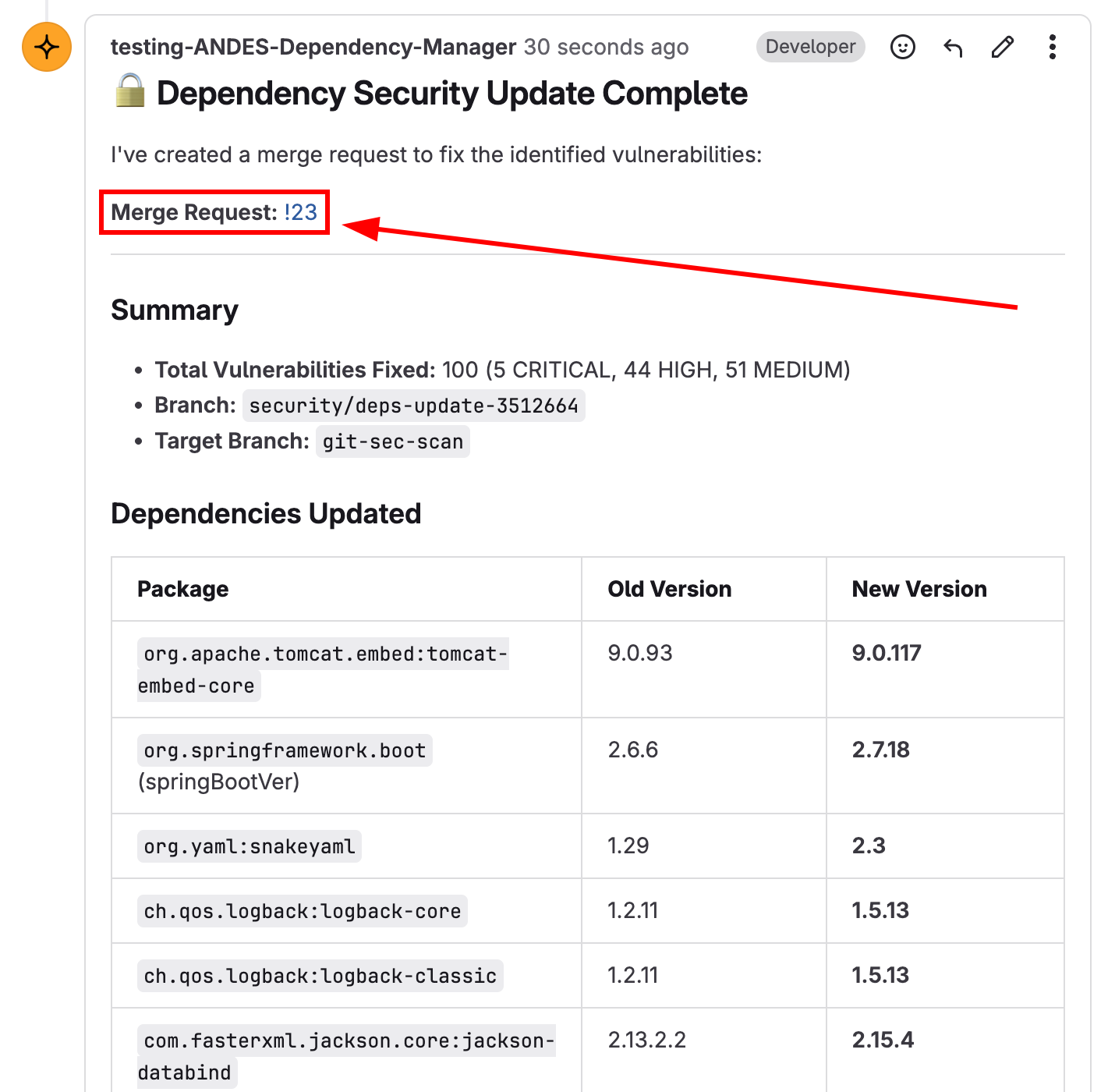
What the flow does:
- ✅ Creates a
security/deps-update-*branch from your specified branch - ✅ Updates all vulnerable dependencies
- ✅ Opens an MR with proposed changes
- ✅ Publishes a comment on the indicated issue with progress
Step 3️⃣: Review the changes in the MR
Inside the opened Merge Request, you'll find all technical information:
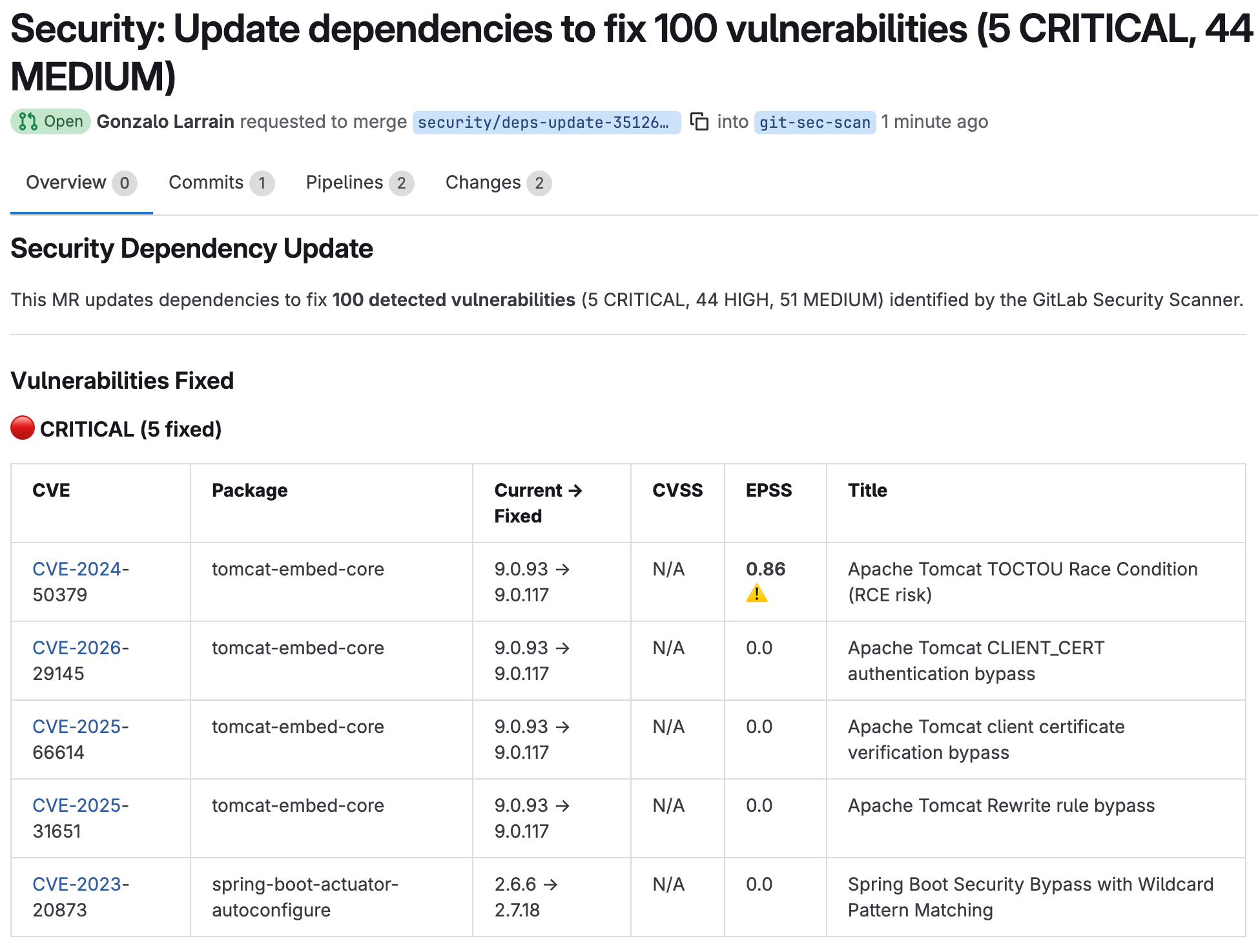
In the MR you'll find:
- Total vulnerabilities fixed (e.g., 100 CRITICAL, 4 HIGH, 51 MEDIUM)
- List of updated dependencies:
- Package name
- Old version → New version
- Example:
tomcat-embed-core: 9.0.53 → 9.0.117
Step 4️⃣: Mitigation prioritization analysis
The best part: the report includes an intelligent prioritization based on:
- Context of your infrastructure (if available in the repository)
- Known exploitability indicators (EPSS)
- Technical severity (CVSS)
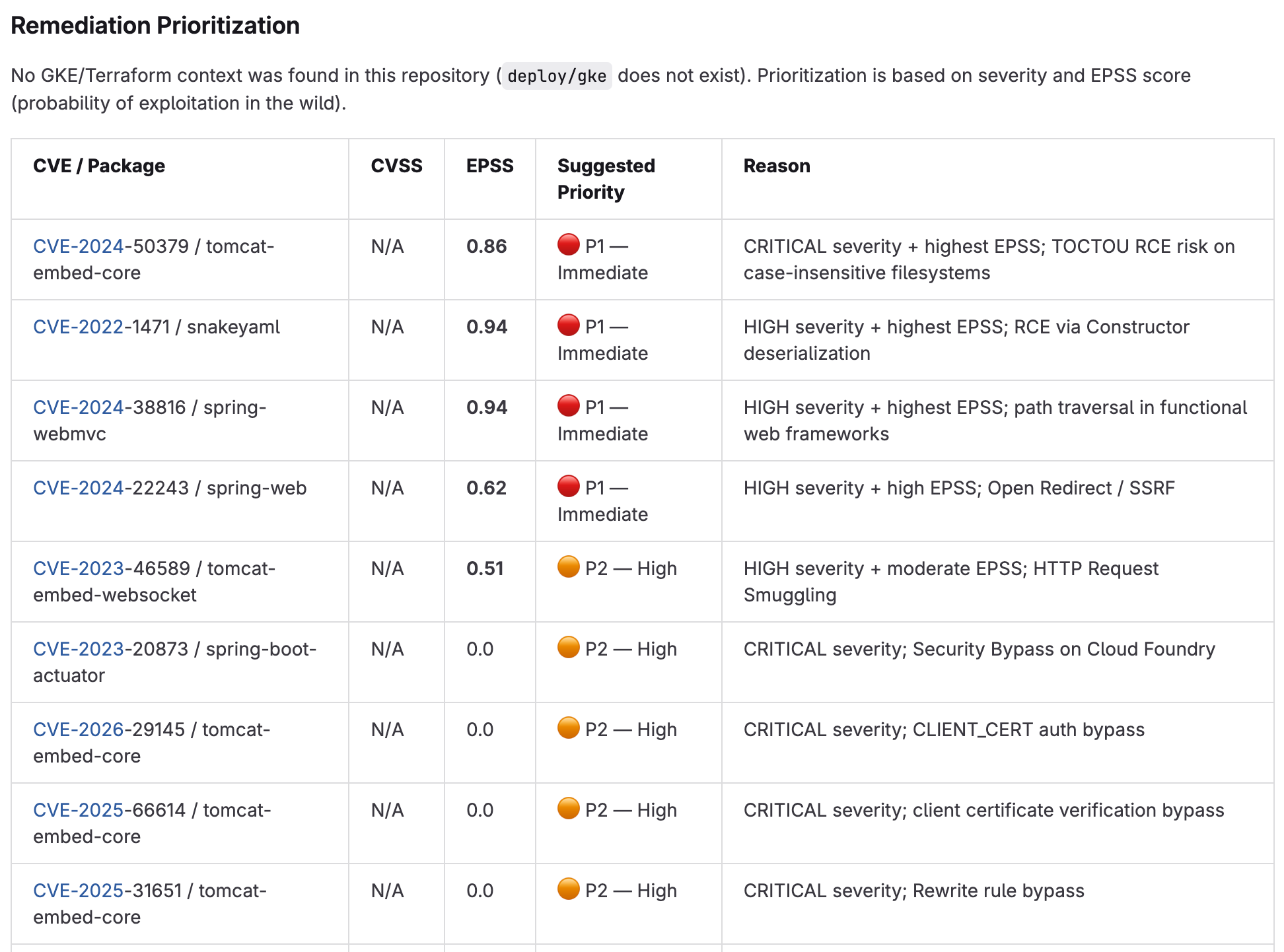
This prioritization helps you to:
- 🎯 Understand which vulnerabilities are most critical in YOUR specific context
- 📊 See the probability of active exploitation
- ⚡ Make informed decisions about what to update first
Risk indicators in the report
Each reported vulnerability includes two risk scores when available:
CVSS Score (0–10)
Technical severity of the vulnerability according to the Common Vulnerability Scoring System. Higher values = critical risk.
- 0-3.9: Low
- 4.0-6.9: Medium
- 7.0-8.9: High
- 9.0-10: Critical
EPSS Score (0.0–1.0)
Exploit Prediction Scoring System: probability that the vulnerability is being actively exploited in the wild.
- 0.0-0.3: Low probability of exploitation
- 0.3-0.7: Moderate probability
- 0.7-1.0: High probability of active exploitation
Quick reference table
| Case | Parameters | Creates MR? | Comments? |
|---|---|---|---|
| Full flow (main) | issue #NNN | Yes → main | Yes |
| Custom branch flow | issue #NNN + target_branch: X | Yes → X | Yes |
| Report only | report_only + issue #NNN | No | Yes |
| Report + custom branch | report_only + target_branch: X + issue #NNN | No | Yes |
Detailed use cases
Case 1: Full flow with main branch
Analyzes vulnerabilities, updates dependencies, creates a branch from main, and opens an MR:
@ai-andes-dependency-manager-latam-airlines Fix dependency vulnerabilities. issue #42
Expected result:
- ✅ Branch created from
main - ✅ Commit with updated dependencies
- ✅ MR opened towards
main - ✅ Comment on issue #42
Case 2: Full flow with custom branch
For projects with a trunk different from main (like develop, release/x.x, staging):
@ai-andes-dependency-manager-latam-airlines Fix vulnerabilities. issue #55. target_branch: develop
We also accept these formats:
@ai-andes-dependency-manager-latam-airlines Analyze deps. issue #12. branch: release/2.3
@ai-andes-dependency-manager-latam-airlines Security scan. issue #99. merge into staging
Case 3: Report only (no MR)
Generate a complete report without creating changes. Ideal for audits or reviewing impact first:
@ai-andes-dependency-manager-latam-airlines report_only. issue #31
Also accepts:
only reportreport onlyno mrno merge request
Case 4: Report on custom branch
Combine report_only with target_branch to see what would happen on a specific branch:
@ai-andes-dependency-manager-latam-airlines report_only. target_branch: develop. issue #88
Important notes
Re-execution
If a branch security/deps-update-* already exists, the agent generates a new one with automatic timestamp.
Branch not found
If the specified branch doesn't exist, verify it exists before running the flow.
Issue IID vs MR IID
The comment is always published in the issue/MR indicated with issue #NNN.
Make sure to use the correct IID of your project.
Changing from report to MR
Run the flow again without report_only on the same issue to apply the changes recommended
in the previous report.
Complete practical example
Scenario: Your project uses develop as the main branch. You want to analyze and fix vulnerabilities.
-
Open a technical issue named: "Update insecure dependencies"
-
In the issue, comment:
@ai-andes-dependency-manager-latam-airlines Please analyze and fix security vulnerabilities.issue #123. target_branch: develop -
The flow works (will take a few minutes):
- ✅ Analyzes all dependencies
- ✅ Identifies vulnerabilities
- ✅ Creates a
security/deps-update-*branch fromdevelop - ✅ Updates package.json, package-lock.json, etc.
- ✅ Opens MR towards
develop - ✅ Publishes a comment on issue #123 with the detailed report
-
Review and approve:
- Review the report in the comment
- Open the MR and verify the technical changes
- Review the mitigation prioritization
- Approve the MR
-
Done! Your project is more secure. Vulnerable dependencies have been updated.
Next steps
- ✅ Request flow activation from your Owner or Maintainer
- 🚀 Start using
@ai-andes-dependency-manager-latam-airlinesin your issues and MRs - 📋 Use
report_onlyfirst if you want to review before making changes - 📚 For support or questions, check the ANDES documentation
Automatic security. Frictionless. Starting today.
Powered by LATAM Security & GitLab Duo Workflow