OpsAgent Framework 2

The pipeline failed! No worries, AI is already fixing it. If you want to spend less time debugging and more time moving forward, meet OpsAgent: the new AI agent that automates GitLab failure resolution so you only need to give the final approval.

What does it do for you?
- Analyze: Identifies the root cause and creates a GitLab issue.
- Suggest: Proposes a solution and generates the MR.
- Review: Leaves the MR ready for you to review and approve.
A faster resolution that automatically reduces debugging time, so your code reaches the main branch successfully and without friction.
For now, OpsAgent is optimized for Framework 2. We will add more frameworks and workflows very soon.
Follow these steps to activate it now!
-
Set up your environment: If you use Framework 2, go to your project's CI/CD settings and create the variable
OPSAI_ENABLEDwith the valuetrue. For custom pipelines
If you do not use the standard framework, you can integrate it through the
$LATAM_OPSAI_OPSAGENTvariable component.include:- componente: $LATAM_OPSAI_OPSAGENT -
Done, it activates automatically: Once configured, the agent will activate automatically to help you analyze what happened whenever it detects that a job has failed.
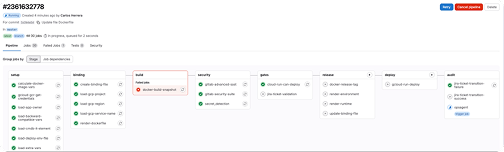
-
Ask for help through the Bot: If you prefer a one-time analysis, you can type the code
0101in our platform bot (ANDES Bot) and paste the failed job ID.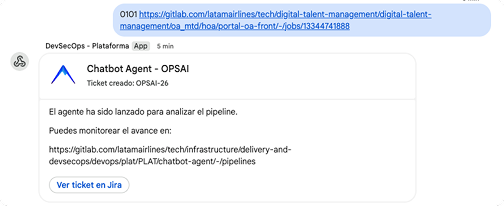
ANDES Ops leads this initiative. If you have any questions, write to us at grp_andes_ops@latam.com and we will help you.